 .
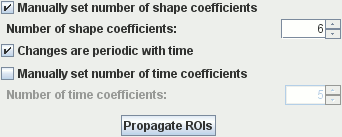
Jim will automatically determine the 'complexity' of the shapes you define, and will
create output Spline ROIs with an appropriate number of spline
knot points
for this complexity. However, you may wish to constrain the shape, or allow greater complexity
by manually setting the number of shape coefficients. Setting the number of coefficients to 1
will constrain all propagated outlines to be circular. Setting it to 2 will allow the
outlines to be elliptical. Increasing further allows greater complexity of the outline shapes.
In general:
.
Jim will automatically determine the 'complexity' of the shapes you define, and will
create output Spline ROIs with an appropriate number of spline
knot points
for this complexity. However, you may wish to constrain the shape, or allow greater complexity
by manually setting the number of shape coefficients. Setting the number of coefficients to 1
will constrain all propagated outlines to be circular. Setting it to 2 will allow the
outlines to be elliptical. Increasing further allows greater complexity of the outline shapes.
In general:
 . This tells the ROI Propagation
tool that the changes in shape are periodic, with a period equal to the total number
of time points in the sequence. Thus, this enforces a smooth transition from the last
frame in the sequence back to the first, with no disjointedness. If the sequence is not
periodic, the ROIs at the last point are propagated without regard to first time point.
. This tells the ROI Propagation
tool that the changes in shape are periodic, with a period equal to the total number
of time points in the sequence. Thus, this enforces a smooth transition from the last
frame in the sequence back to the first, with no disjointedness. If the sequence is not
periodic, the ROIs at the last point are propagated without regard to first time point.
 .
By default, Jim will not enforce any continuity between time points - it simply uses
the image data to drive the changes in shape between time points. However, when the image
quality is poor in some image frames, this can result in the shape and position of propagated
ROIs changing in an unsatisfactory way for some time points. You can constrain the propagation
to enforce smooth transitions in ROI shape and position by setting the number of time
coefficients manually.
.
By default, Jim will not enforce any continuity between time points - it simply uses
the image data to drive the changes in shape between time points. However, when the image
quality is poor in some image frames, this can result in the shape and position of propagated
ROIs changing in an unsatisfactory way for some time points. You can constrain the propagation
to enforce smooth transitions in ROI shape and position by setting the number of time
coefficients manually.
Reducing the number of time coefficients forces smoother transitions from one frame to the next, while increasing it allows greater freedom for the ROIs to follow complex, rapid motion. Using the minimum number number of time coefficients that still allows proper description of the motion will decrease the risk that the ROI Propagation tool will not track the images features reliably.
 button to begin the propagation.
Depending on the number of shape and time coefficients used, processing can take a few moments.
The propagated ROIs will be loaded into Jim's main display, for you to review. If you are
not satisfied with the result, you can make changes to the propagation options and try
again, or you can manually edit the propagated ROIs to
your satisfaction.
button to begin the propagation.
Depending on the number of shape and time coefficients used, processing can take a few moments.
The propagated ROIs will be loaded into Jim's main display, for you to review. If you are
not satisfied with the result, you can make changes to the propagation options and try
again, or you can manually edit the propagated ROIs to
your satisfaction.